1. Preamble and Problem
For many years, Penguin Pty Ltd (a small software business run by Atilla Brungs) has dominated the native application gaming market with hit games. However in recent years, advancements in web technologies mean that the new generation of consumers don’t want to download and run a native application, but instead want to play games online. To adapt to the ever-changing market, Penguin Pty Ltd decided in 2021 to take users back to the 1980s and develop a new game called Dungeonmania, but with a modern twist - designed as a web application.
Together, their team of engineers built an MVP which brought Penguin back to #1 on the charts - but now the users are wanting more! The hard working backend engineers, previous terms’ COMP2511 students have all left. A lull in sales has left only budget for two people rather than the previous five to work on the backend. What’s more, the previous engineers left a series of design issues in their implementation.
[[TOC]]
2. Product Specification (MVP)
Section titled “2. Product Specification (MVP)”You have been hired and have inherited the existing codebase for the Dungeonmania game.
You have been given the product specification from the MVP version of Dungeonmania to help you understand the existing code and functionality it provides.
NOTE: All of this functionality in this file has been implemented in the monolith repository we have provided to you. You do not need to implement it yourselves.
In Dungeon Mania you control a Player and have to complete various goals within a series of dungeons to complete the game!
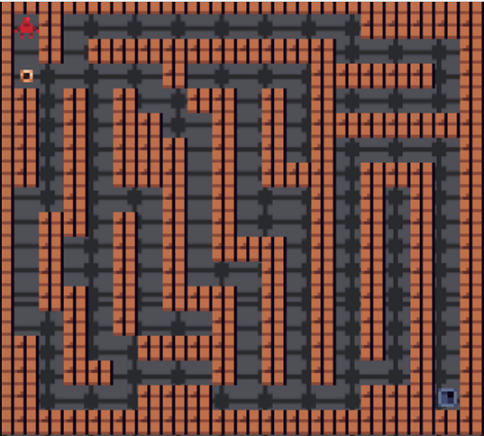
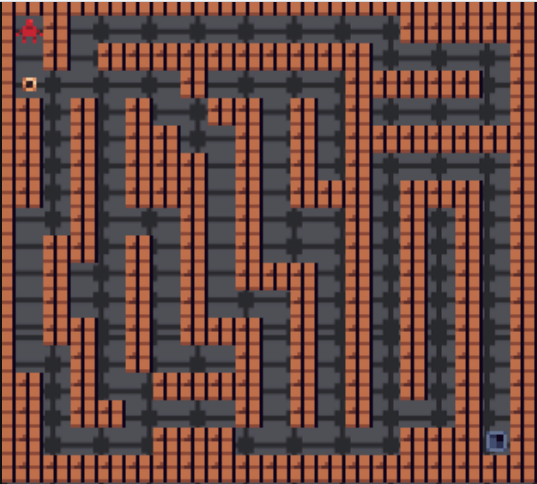
The simplest form of such a puzzle is a maze, where the Player must find their way from the starting point to the exit.
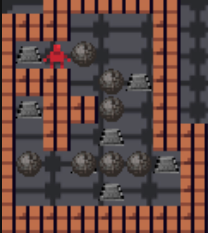
More advanced puzzles may contain things like boulders that need to be pushed onto floor switches,
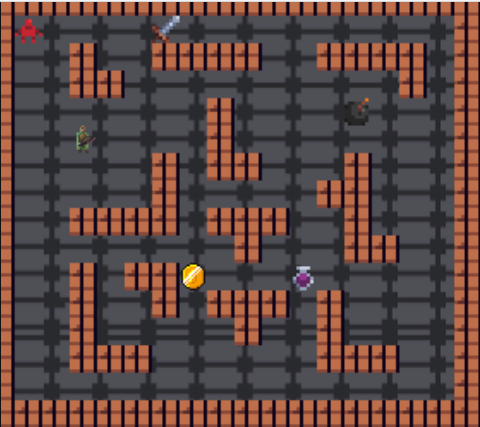
enemies that need to be fought with weapons, or collectables like potions and treasure.
2.0 Map
Section titled “2.0 Map”Entities occupy tiles on the map. Each tile has an (x,y) coordinate. The map is infinite in all directions.
More information on the technical details of the map is available in Section 4.1.
2.1 Player
Section titled “2.1 Player”There is only one player per game.
The Player, can be moved up, down, left and right into cardinally adjacent squares, provided another entity doesn’t stop them (e.g. a wall). The Player begins the game with a set amount of health and attack damage. The Player spawns at a set ‘entry location’ at the beginning of a game.
2.2 Static Entities
Section titled “2.2 Static Entities”The game contains the following static entities.
| Entity | Image | Description |
|---|---|---|
| Wall |  |
Blocks the movement of the Player, enemies and boulders. |
| Exit |  |
If the Player goes through it, the puzzle may be complete. |
| Boulder |  |
Acts like a wall in most cases. The only difference is that it can be pushed by the Player into cardinally adjacent squares. The Player is only strong enough to push one boulder at a time. When the player pushes a boulder, they move into the spot the boulder was previously in. Boulders can be pushed onto collectable entities. |
| Floor Switch |  |
Switches behave like empty squares, so other entities can appear on top of them. When a boulder is pushed onto a floor switch, it is triggered. Pushing a boulder off the floor switch untriggers it. Boulders will never spawn on switches. |
| Door |  |
Exists in conjunction with a single key that can open it. If the Player holds the key, they can open the door by moving through it. Once open, it remains open. |
| Portal |  |
Teleports players to a corresponding portal. The player must end up in a square cardinally adjacent to the corresponding portal. The square they teleport onto must also be within movement constraints - e.g. the player cannot teleport and end up on a wall. If all squares cardinally adjacent to the corresponding portal are walls, then the player should remain where they are. |
| Zombie Toast Spawner |  |
Spawns zombie toasts in a square cardinally adjacent to the spawner that does not contain a wall. If all of the cardinally adjacent cells to the spawner contain walls, then the spawner will not spawn any zombies. If the player has a weapon (sword or bow **only**) and is cardinally adjacent to the spawner, they can destroy the zombie spawner by interacting with it. The spawner will be destroyed immediately and the durability of the weapon will be decreased by 1. |
2.3 Moving Entities
Section titled “2.3 Moving Entities”In addition to the Player, the game contains the following moving entities.
All enemy entities can be created as part of the initial dungeon. Each tick, all enemies move according to their respective behaviour.
| Entity | Image | Description |
|---|---|---|
| Spider |  |
Spiders spawn at random locations in the dungeon from the beginning of the game. When the spider spawns, they immediately move the 1 square upwards (towards the top of the screen) and then begin 'circling' their spawn spot (see a visual example below). Spider Movement Figure 1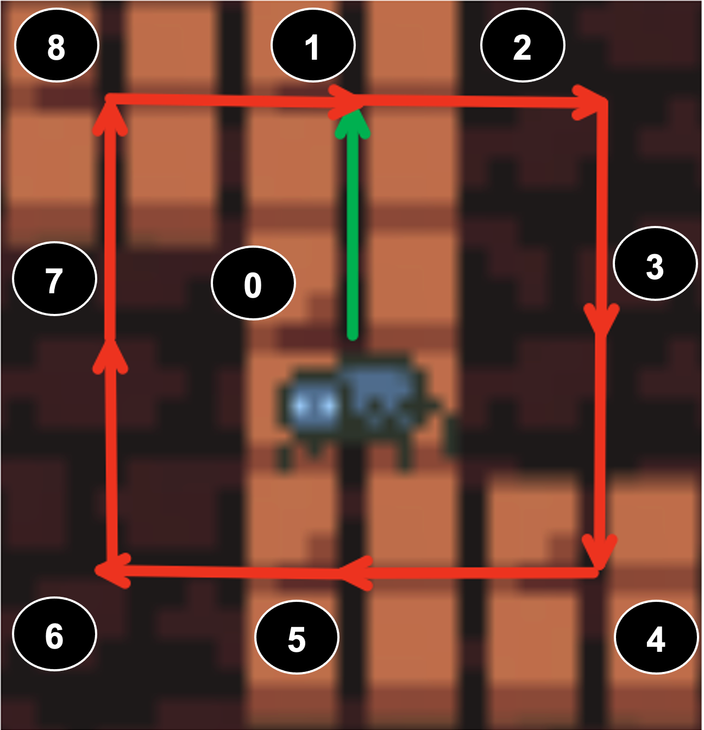
Spiders are able to traverse over walls, doors, switches, portals, exits (which all have no effect), but not boulders, in which case it will reverse direction (see a visual example below). Spider Movement Figure 2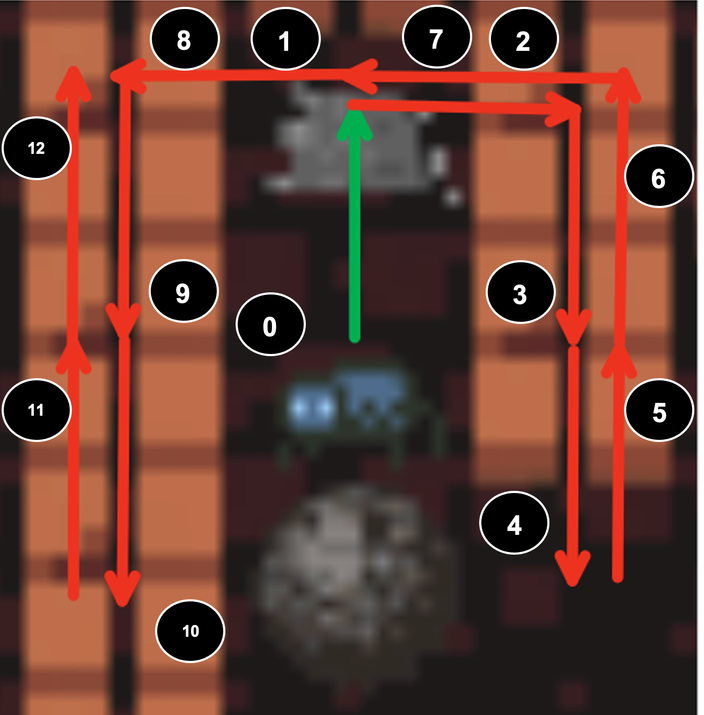
Spiders spawn in a square that is less than or equal to a radius of 20 (via Manhattan distance) around the player’s current position. If there is no available space, a spider is not spawned. Spiders cannot spawn on boulders, or in the same square as the player/enemies. If a spider is stuck between two boulders in its movement path, it should remain still. |
| Zombie Toast |  |
Zombies spawn at zombie spawners and move in random directions. Zombies are limited by the same movement constraints as the Player, except portals have no effect on them. |
| Mercenary |  |
Mercenaries do not spawn; they are only present if created as part of the dungeon. They constantly move towards the Player, stopping only if they cannot move any closer (they are able to move around walls). Mercenaries are limited by the same movement constraints as the Player. All mercenaries are considered hostile, unless the Player can bribe them with a certain amount of gold; in which case they become allies. Mercenaries must be within a certain radius of the player in order to be bribed, which is formed by the diagonally and cardinally adjacent cells in a "square" fashion, akin to the blast radius for bombs. As an ally, once it reaches the Player it simply follows the Player around, occupying the square the player was previously in. |
2.4 Collectable Entities
Section titled “2.4 Collectable Entities”Collectable entities can be picked up by the player by walking over the tile the item is on. This will place the item into the player’s inventory.
| Entity | Image | Description |
|---|---|---|
| Treasure |  |
Can be picked up by the Player. |
| Key |  |
Can be picked up by the player when they move into the square containing it. The Player can carry only one key at a time, and only one door has a lock that fits the key. Keys disappear once used in any context i.e. opening a door, building an item. If a key is used before opening its door, its corresponding door may be locked forever. |
| Invincibility Potion |  |
When a Player picks up an Invincibility potion, they may consume it at any time. Any battles that occur when the Player has the effects of the potion end immediately after the first round, with the Player immediately winning and taking no damage. Zombies and hostile mercenaries will run away from the player when the player is invincible. Movement of spiders and allied mercenaries remains unaffected. The effects of the potion only last for a limited time. |
| Invisibility Potion |  |
When a player picks up an invisibility potion, they may consume it at any time and they immediately become invisible and can move past all other entities undetected. This means that hostile mercenaries will no longer pursue the player and will now move randomly when the player is invisible, though allies will continue to follow the player. Battles do not occur when a player is under the influence of an invisibility potion. |
| Wood |  |
Can be picked up by the Player. |
| Arrows |  |
Can be picked up by the Player. |
| Bomb |  |
Can be collected by the player. When used it is removed from the inventory it is placed on the map at the player's location. When a bomb is cardinally adjacent to an active switch, it destroys all entities in diagonally and cardinally adjacent cells, except for the player, forming a "square" blast radius. The bomb should detonate when it is placed next to an already active switch, or placed next to an inactive switch that then becomes active. The bomb explodes on the same tick it becomes cardinally adjacent to an active switch. A bomb cannot be picked up once it has been placed down or exploded. |
| Sword |  |
A standard melee weapon. Swords can be collected by the Player and used in battles, increasing the amount of damage they deal by an additive factor. Each sword has a specific durability that dictates the number of battles it can be used before it deteriorates and is no longer usable. |
Players can only be under the effect of one potion at a time. It is possible for a player to use another potion while the effects of an existing potion are still lasting (can be of the same or a different type of potion). In this case, the effects are not registered immediately but are instead ‘queued’ and will take place the tick following the previous potion wearing of. For example:
- On tick 0 the Player consumes an invisibility potion that lasts for 5 ticks and becomes invisible to enemies moving that tick
- On tick 3 they use an invincibility potion
- At the end of tick 4 (after all enemy movements) the player becomes visible again and becomes invincible.
2.5 Buildable Entities
Section titled “2.5 Buildable Entities”Some entities can be built using a ‘recipe’ by the player, where entities are combined to form more complex and useful entities. Once a buildable item has been constructed, it is stored in a player’s inventory. For all buildable entities, once the item is constructed the materials used in that construction have been consumed and disappear from the player’s inventory.
| Entity | Image | Description |
|---|---|---|
| Bow |  |
Can be crafted with 1 wood + 3 arrows. The bow has a durability which deteriorates after a certain number of battles. Bows give the Player double damage in each round, to simulate being able to attack an enemy at range (it can't actually attack an enemy at range). |
| Shield |  |
Can be crafted with 2 wood + (1 treasure OR 1 key). Shields decrease the effect of enemy attacks. Each shield has a specific durability that dictates the number of battles it can be used before it deteriorates. |
2.6 Battles
Section titled “2.6 Battles”A battle takes place when the Player and an enemy are in the same cell at any point within a single tick. The conditions for a battle occurring are the same regardless of whether the player moves onto the same tile as the enemy, or vice versa.
A ‘round’ of a battle occurs as follows:
Player Health = Player Health - (Enemy Attack Damage / 10)Enemy Health = Enemy Health - (Player Attack Damage / 5)Damage will be applied simultaneously to the player and enemy in each round.
If the Player’s health is <= 0, then the Player dies, is removed from the game and the game is over. If the enemy’s health is <= 0, then the enemy dies and is removed from the game. If after the above ‘round’, neither the Player nor the enemy is dead, the round repeats until either the Player or enemy is dead.
All rounds of a battle take place within a single tick.
2.6.1 Weapons in Battle
Section titled “2.6.1 Weapons in Battle”In battles, weapons, allies and other supporting items provide an attack and defence bonus to the player.
These buffs can be additive (+), subtractive (-), multiplicative (*), or reductive (/), and stack onto each other. You can have multiple weapons/allies/supporting items of the same type.
An example of a bow, sword and shield being used in battle is as follows:
player health = 10player base attack damage = 5bow attack damage = 2sword attack damage = 1shield defence = 2enemy health = 10enemy attack damage = 5
Battle occurs:- Round 1   enemy health    = 10 - ((2 * (5 + 1)) / 5)  = 7.6            player health   = 10 - ((5 - 2) / 10)       = 9.7- Round 2   enemy health    = 7.6 - ((2 * (5 + 1)) / 5) = 5.2            player health   = 9.7 - ((5 - 2) / 10)      = 9.4- Round 3   ...
All additive/subtractive bonuses are processed before multiplicative/reductive bonuses.
2.7 Goals
Section titled “2.7 Goals”In addition to its layout, each dungeon also has a goal that defines what must be achieved by the player for the dungeon to be considered complete. Basic goals are:
- Being on the exit;
- Having a boulder on all floor switches;
- Collecting a certain number of treasure items (or more). This is the total amount collected, not the amount in the inventory.
Goals are only evaluated after the first tick.
It is possible for a goal to become un-achived, such as if the player gets to the exit (goal achieved) and then steps off of it, or if a boulder is moved off of a floor switch.
2.7.1 Complex Goals
Section titled “2.7.1 Complex Goals”More complex goals can be built by logically composing goals. For example:
- Collecting a certain number of treasure AND getting to an exit
- Collecting a certain number of treasure OR having a boulder on all floor switches
- Getting to an exit AND (having a boulder on all floor switches OR collecting all treasure)
All compound goals are binary (they contain two and only two subgoals).
2.8 Winning & Losing
Section titled “2.8 Winning & Losing”The game is won when all the goals are achieved. The game is lost when the player dies and is removed from the map. There is no set behaviour for ticks occuring in the game after winning or losing.
It is also possible for the game to be in an unwinnable state. In this case, gameplay continues as usual.
2.9 Advanced Movement
Section titled “2.9 Advanced Movement”The movement of mercenaries follows a Djikstra’s algorithm to take the shortest path towards the player.
Pseudocode for this algorithm
Note: This is not necessarily optimal (A* is probably a better algorithm for our common maze like dungeons), but since this is a design course and not an algorithms course, this is fine.
function Dijkstras(grid, source):let dist be a Map<Position, Double>let prev be a Map<Position, Position>
for each Position p in grid:    dist[p] := infinity    previous[p] := nulldist[source] := 0
let queue be a Queue<Position> of every position in gridwhile queue is not empty:    u := next node in queue with the smallest dist    for each cardinal neighbour v of u:        if dist[u] + cost(u, v) < dist[v]:            dist[v] := dist[u] + cost(u, v)            previous[v] := ureturn previous
📝 All references to radii distances are Manhattan Distances unless otherwise specified.
2.10 Tick Definition
Section titled “2.10 Tick Definition”A tick is a transition from one state to a new state. A tick always starts with user input. This input can include moving, using an item, crafting an object, or interacting with an entity.
Then the game world changes in the tick and ends when another user input is needed. So “tick n” is the transition from the n-th state to the (n+1)-th state. There can be multiple developer-defined phases within one tick deciding the order of changes to the game world. Here is one possible example of a phase sequence to help you understand.
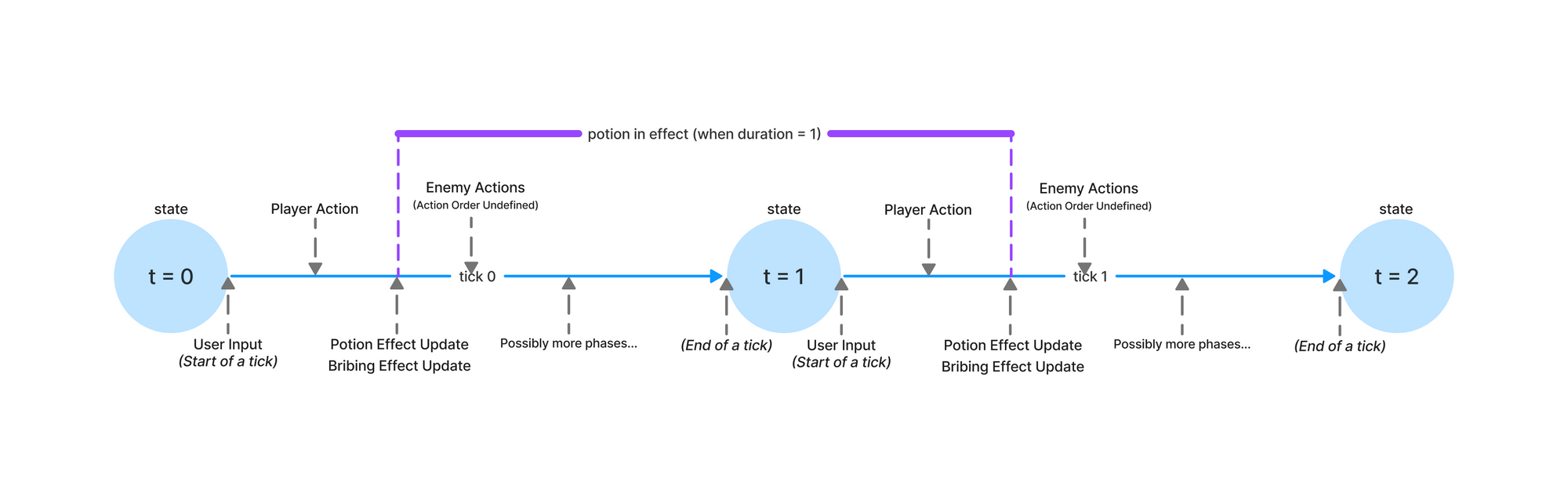
Within a phase of a tick, actions can happen in any order. For example, enemies can move in any order. Or if a player picks up an item and triggers a battle in the same action, this can occur in either order.
3. UML Diagram
Section titled “3. UML Diagram”A sample UML diagram of this MVP specification has been included in this repository.
Note there may be minor inaccuracies or omissions in this diagram, as it is purely for reference purposes. Refer to the specification for the definitive requirements.
You may choose to create your own personal editable copy of the UML diagram using this LucidChart link. However, you are not required to do so.
4. Technical Specification
Section titled “4. Technical Specification”4.1. Dungeon Maps
Section titled “4.1. Dungeon Maps”All maps are infinite in all directions.
Moving left/right is a decrease/increase in the x co-ordinate of an entity respectively, moving up/down is a decrease/increase in the y co-ordinate of an entity respectively.
Each game requires a dungeon map to be loaded in. Dungeon maps consist of JSON files which contain the following:
entities, an array of entities in the map when the game starts; andgoal-condition, a specification of the goals for winning the dungeon.
There will be no other fields present in the JSON.
4.1.1 Input Specification - Entities (MVP)
Section titled “4.1.1 Input Specification - Entities (MVP)”Each entry in the entities JSON Array will be a JSON Object with the following fields:
x- the x-position of the entity in the dungeon when the game starts;y- the y-position of the entity in the dungeon when the game starts; andtype- the type of the entity.
The combination of x and y will be unique for each entity in on the map - i.e. only one entity will ever be created per tile.
The type field will be a string that starts with one of the following prefixes. For automarking purposes, all entities passed in will have a type in the following table.
| Entity | JSON Prefix | Creatable from Dungeon Map? |
|---|---|---|
| Player |
player
|
Yes |
| Wall |
wall
|
Yes |
| Exit |
exit
|
Yes |
| Boulder |
boulder
|
Yes |
| Floor Switch |
switch
|
Yes |
| Door |
door
|
Yes |
| Portal |
portal
|
Yes |
| Zombie Toast Spawner |
zombie_toast_spawner
|
Yes |
| Spider |
spider
|
Yes |
| Zombie Toast |
zombie_toast
|
Yes |
| Mercenary |
mercenary
|
Yes |
| Treasure |
treasure
|
Yes |
| Key |
key
|
Yes |
| Invincibility Potion |
invincibility_potion
|
Yes |
| Invisibility Potion |
invisibility_potion
|
Yes |
| Wood |
wood
|
Yes |
| Arrows |
arrow
|
Yes |
| Bomb |
bomb
|
Yes |
| Sword |
sword
|
Yes |
| Bow |
bow
|
No, since this entity must be built by the player. |
| Shield |
shield
|
No, since this entity must be built by the player. |
4.1.2 Extra Fields (MVP)
Section titled “4.1.2 Extra Fields (MVP)”Some entities will contain additional fields in their JSON entry, namely:
- All entities of type portal will have a field
colour. Two portals which have the same colour are linked (travelling through one portal takes you to the other). We will never provide a dungeon which has more than two portals of the same colour, and all portals will have a counterpart of the same colour in the dungeon. - All entities of type door and key will have a
keyfield which, in the case of the key is the identifier of the key, and in the case of the door the id of the key which fits that door.
4.1.3 Entity Variants (MVP)
Section titled “4.1.3 Entity Variants (MVP)”Some entities may have different variations that need to be represented to the player. Currently, this includes portal colours and door status, and the code that handles this can be found in dungeonmania/util/NameConverter.java.
| Base Entity | Variants | Notes |
|---|---|---|
| Portal | portal_{COLOUR} (eg. portal_red) |
Portals are always represented with a color, which will be appended after the "portal" prefix. |
| Door | door, door_open |
When a door is open it is represented with the "_open" suffix, however a closed door is just represented as door. |
You may edit NameConverter.java if you find that you need to represent any other varied entities.
4.1.4 Input - Goals (MVP)
Section titled “4.1.4 Input - Goals (MVP)”A basic goal is represented in the dungeon as:
"goal-condition": { "goal": <goal>}Where <goal> is one of "boulders", "treasure" or "exit".
A complex goal is represented in the dungeon as:
"goal-condition": { "goal": <supergoal>, "subgoals": [ {"goal": <goal>}, {"goal": <goal>} ]}Where <goal> is one of "boulders", "treasure" or "exit", or another nested goal conjunction/disjunction itself, and <supergoal> is one of "AND" or "OR".
4.2. Configuration Files
Section titled “4.2. Configuration Files”In config_template.json we have specified the template for a configuration file. This file is important as it specifies internal game mechanics which will affect the external behaviour of your application. Rather than hard coding these constants into your classes, you must instead read in these values from the specified file when the game is created.
During automarking, we will be providing our own configuration files with each test dungeon - this allows our tests to set parameters that should ensure behaviours are produced without ambiguity. For this reason, if you do not read in the values correctly, you will likely fail a large number of our autotests.
Configuration fields are all integers unless specifically stated otherwise.
4.2.1 Configuration Fields (MVP)
Section titled “4.2.1 Configuration Fields (MVP)”| JSON Format |
Description |
|---|---|
ally_attack
|
Attack bonus each ally gives to the player. |
ally_defence
|
Decrease in effect of enemy attack damage each ally gives to the player. |
bribe_radius
|
Radius in which a mercenary can be bribed. |
bribe_amount
|
Amount of gold required to bribe a mercenary. |
bomb_radius
|
Blast radius of bomb. |
bow_durability
|
The number of battles that the bow lasts for. |
player_health
|
Health of the character. |
player_attack
|
Attack damage of the character. |
invincibility_potion_duration
|
The effects of the potion only last for x ticks. |
invisibility_potion_duration
|
The effects of the potion only last for x ticks. |
mercenary_attack
|
Attack damage of the mercenary. |
mercenary_health
|
Health of the mercenary. |
spider_attack
|
Attack damage of the spider. |
spider_health
|
Health of the spider. |
spider_spawn_interval
|
Spiders spawn every x ticks, starting from the x'th tick. Spawn rate of 0 means that spiders will never spawn in the game. |
shield_durability
|
The number of battles that the shield lasts for. |
shield_defence
|
The decrease in the effect of the attack damage of the enemy as a result of the shield. |
sword_attack
|
Amount of damage added to a players' attack damage when they use a sword in battle. |
sword_durability
|
The number of battles that the sword lasts for. |
treasure_goal
|
At least x treasure must be collected to complete the treasure goal |
zombie_attack
|
Attack damage of the zombie toast. |
zombie_health
|
Health of the zombie toast. |
zombie_spawn_interval
|
Zombies spawn every x ticks from each spawner, starting from the x'th tick. Spawn rate of 0 means that zombies will never spawn in the game. |
4.3 Interface
Section titled “4.3 Interface”The layer of abstraction is at the level of the controller. In the starter code, we have provided a class DungeonManiaController.
The controller methods interact with a HTTP layer in the form of a web server, which we have written for you.
4.3.1 Interface Data Types
Section titled “4.3.1 Interface Data Types”We have provided the following interface data types for you inside response/models. Similarly as for the assignment, you will need to create objects of these types for the controller to return and communicate information to the server layer.
In case you are interested, the server layer then wraps these objects inside a GenericResponseWrapper, a generic type we have made for you, and converts these objects to JSON using a library called gson to allow them to be communicated to the frontend via a HTTP response.
| Constructor Prototype |
Description |
|---|---|
public DungeonResponse(String dungeonId, String dungeonName, List |
|
public BattleResponse(String enemy, List |
|
public RoundResponse(double deltaPlayerHealth, double deltaEnemyHealth) |
Note that each of these deltas can be positive and that the 'sign' of the health matters (e.g. positive deltas correlate to increase and negative deltas correlated to decrease in health). |
public EntityResponse(String id, String type, Position position, boolean isInteractable) |
|
public ItemResponse(String id, String type) |
|
public Position(int x, int y, int layer) |
|
public enum Direction {
        UP(0, -1),
        DOWN(0, 1),
        LEFT(-1, 0),
        RIGHT(1, 0);
} |
Direction of movement for the player. |
4.3.2 Interface Methods
Section titled “4.3.2 Interface Methods”| Method Prototype |
Description |
Exceptions |
|---|---|---|
public DungeonResponse newGame(String dungeonName, String configName) throws IllegalArgumentException |
Creates a new game, where dungeonName is the name of the dungeon map (corresponding to a JSON file stored in the model) and configName is the name of the configuration file.
|
IllegalArgumentException:
|
public DungeonResponse getDungeonResponseModel() |
Return the dungeon response for the current state of the game without any side effects on the game. | N/A |
public DungeonResponse tick(String itemUsedId) throws InvalidActionException |
Ticks the game state when the player uses/attempts to use an item. The player's action (attempts/using an item) must be carried out first, then enemy movement. As soon as the item is used, it is removed from the inventory. |
IllegalArgumentException:
InvalidActionException:
|
public DungeonResponse tick(Direction movementDirection)
|
Ticks the game state when the player moves in the specified direction one square. The player's movement must be carried out first, then enemy movement. | N/A |
public DungeonResponse build(String buildable) throws InvalidActionException
| ||
public DungeonResponse interact(String entityId) throws IllegalArgumentException
|
4.3.3 Interface Exceptions
Section titled “4.3.3 Interface Exceptions”The only two exceptions throwable by the Controller are:
IllegalArgumentException(an builtin unchecked exception) on the specified conditions; andInvalidActionException(a custom-defined checked exception insidesrc/main/java/dungeonmania/exceptions).
You can throw them in any order you like, we will not test any input that would fit multiple exceptions at the same time.
4.3.4 Other Interface Files
Section titled “4.3.4 Other Interface Files”| File |
Path |
Description |
Should you need to modify this? |
|---|---|---|---|
DungeonManiaController.java |
src/main/java/dungeonmania/DungeonManiaController.java |
Contains one method for each command you need to implement. | Yes |
App.java |
src/main/java/App.java |
Runs a server for Dungeon Mania. | No |
Position.java, Direction.java, and FileLoader.java |
src/main/java/dungeonmania/util/Position.java, src/main/java/dungeonmania/util/FileLoader.java, and src/main/java/dungeonmania/util/Direction.java |
See section 4.3.1 | No - do not modify these as we will rely on them being the same in automarking. |
DungeonResponse.java, EntityResponse.java, GenericResponseWrapper.java, and ItemResponse.java |
src/main/java/dungeonmania/response/models/ |
See section 4.3.1 | No. |
Scintilla.java and auxiliary files; Environment.java, PlatformUtils.java, and WebServer.java |
src/main/java/scintilla |
Contains a small custom built wrapper around Spark-Java for running a web server. When run it automatically opens a web browser. | No. |
InvalidActionException.java |
src/main/java/dungeonmania/exceptions |
A checked exception to throw when an invalid action is attempted (See Section 4.3.5). | No - do not modify this class as we will be relying on it during automarking. |
4.3.4 Gameplay
Section titled “4.3.4 Gameplay”Although you are only responsible for the improvement of the backend, a sample frontend has been provided for you.
The game will require you to select a dungeon file and configuration file. Dungeon and configuration files may be loaded into the frontend by placing them in the main/resources/dungeons and main/resources/configs folders respectively.
The player character can be moved using the WASD keys. Building and using items is performed by clicking the relevant icon in the inventory using the mouse. Interacting is performed by clicking the relative entity on the game map.
As the frontend is not a product requirement, the frontend provided is only a sample and may contain bugs.